Explore an American First
Step inside the world’s first penitentiary, a bold 19th century experiment in justice reform. With architectural, social, and historical significance, Eastern State Penitentiary Historic Site harnesses the power of place to deepen our collective understanding of the American justice system and inspire us to consider how we can build a more just future together.
Discover. Discuss. Share.
Every visit to Eastern State Penitentiary Historic Site is unique! ESPHS offers a variety of tours, exhibits, programs, and other dynamic ways to engage with this iconic site’s powerful history and reflect on the impact of the justice system.
Experience ESPHS your way – with an audio tour, a guide-led tour, or a self-guided exploration – all included with admission.
Visiting with 15 people or more? Interested in a private Guide-Led Tour? Learn more about Group Visits.
100% of ticket sales proceeds go directly to benefit our mission.
Included with Admission
Audio Tour
Explore at your own pace with a narrated tour featuring voices from the penitentiary’s past.
Guide-Led Tour
Join an educator for a deep dive into the penitentiary’s history and modern-day relevance.
Mini Tours
Take a quick detour to experience unique spaces and topics in 20 minutes or less.
Art
View powerful art that illuminates history and explores incarceration today.
Exhibits
Engage with exhibits that connect our legacy to today’s criminal justice system.
Plan your visit!
Get ready to experience Eastern State Penitentiary Historic Site. Learn more about what to bring, where to go, and how to make the most of your visit.
Know Before You GoUpcoming Historic Site Events
_(1).jpg)
A Time for Liberty: Our Shared History, Our Shared Future
Monday, May 25 - Thursday, December 31, 2026
A yearlong slate of free, inclusive programs exploring the evolving meanings of liberty and justice in America.

Halloween Nights
Friday, October 02, 2026
All Day
Select nights, October 2 through November 7. Step inside Eastern State's massive front gate and into a Halloween festival of epic proportions — featuring five thrilling haunted houses plus historic tours, themed bars, live entertainment, and more — all inside the massive, abandoned complex of a real, ten-acre prison.
The Aaron Reichlin Restorative Justice and Faith Conversations
Tuesday, October 13 - Thursday, December 31, 2026
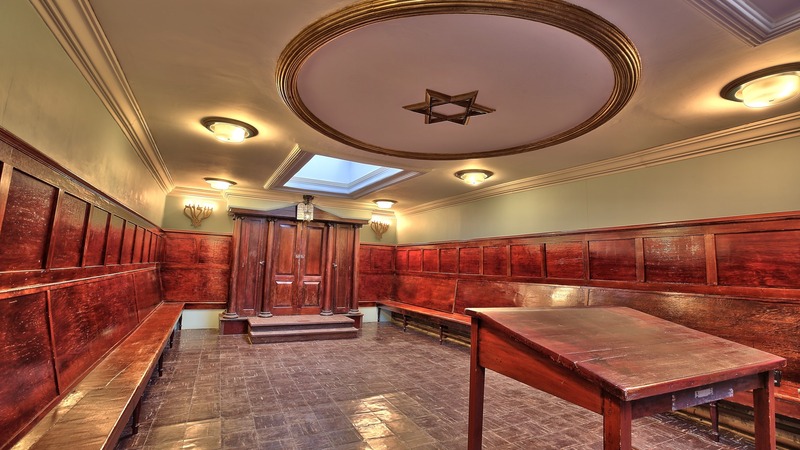
Made possible in part by a generous grant from The Reichlin and Tuck Families, this series brings together scholarship, performance, and dialogue to examine how faith traditions foster community, sustain people through and after incarceration, and inform conversations about reentry and justice reform.

Hidden History: Behind the Scenes of Halloween Nights
Wednesday, October 21, 2026
6:30pm - 7:30pm
Private event. An exclusive evening that unlocks the hidden history of our landmark site and takes you behind the curtain of Halloween Nights.

Masonry Academy Graduation
Friday, October 30, 2026
All Day
Private event. The Eastern State Center for Justice Education invites family, friends, and program partners to celebrate the graduation of the Preservation Trades Center's Masonry Academy.
Winter Festival of Independence and Natural Rights
Sunday, November 01, 2026
All Day
Details to come, check back for updates.

Veterans Day
Saturday, November 07, 2026
All Day
Spend your Veterans Day Weekend learning more about veterans and the criminal justice system through limited-time, family-friendly programs including a veterans and wartime pop-up exhibit, World War I at Eastern State pop-up talk, and video screening about veterans and the justice system today.
New Exhibit Opening!
Friday, November 20, 2026
All Day
Details to come, check back for updates.

Closed for Thanksgiving
Thursday, November 26, 2026
All Day
Eastern State Penitentiary Historic Site is closed for Thanksgiving. We resume normal hours on Friday.
_(1).jpg)
Thanksgiving Weekend: The Power of Play: Sports and Belonging
Friday, November 27, 2026
All Day
Learn more about the power of sports in fostering a sense of belonging throughout the penitentiary's history and in correctional facilities today.

RockyFest - 50th Anniversary!
Thursday, December 03, 2026
All Day
Celebrate the anniversary of Philadelphia’s most iconic film franchise with a city-wide series of events, including special programming at ESPHS highlighting the history of boxing in prison.

Shared Light: Winter Celebrations
Sunday, December 20, 2026
All Day
This holiday season, learn how people at Eastern State Penitentiary marked winter celebrations like Hanukkah, Christmas, and New Year’s Day—finding moments of light, connection, and meaning within the confines of prison life. Plus, reflect on how people observe holidays while incarcerated in prisons today. Enjoy limited-time, family-friendly programming like card making, story sharing, a scavenger hunt, and special guide-led tours.
Closed for Christmas Eve and Christmas Day
Thursday, December 24, 2026
All Day
Eastern State Penitentiary Historic Site is closed December 24 and 25. We resume normal hours on December 26.